✅ Build Protocols
The objective of this frame is to create and organize the protocols that define how the platform operates.
Before explaining how the orchestration system is designed to build these protocols, it is important to understand how the protocol structure is organized within the package.
🧩 Protocol Hierarchy
The following diagram illustrates the hierarchical relationship between the different elements that make up a protocol:
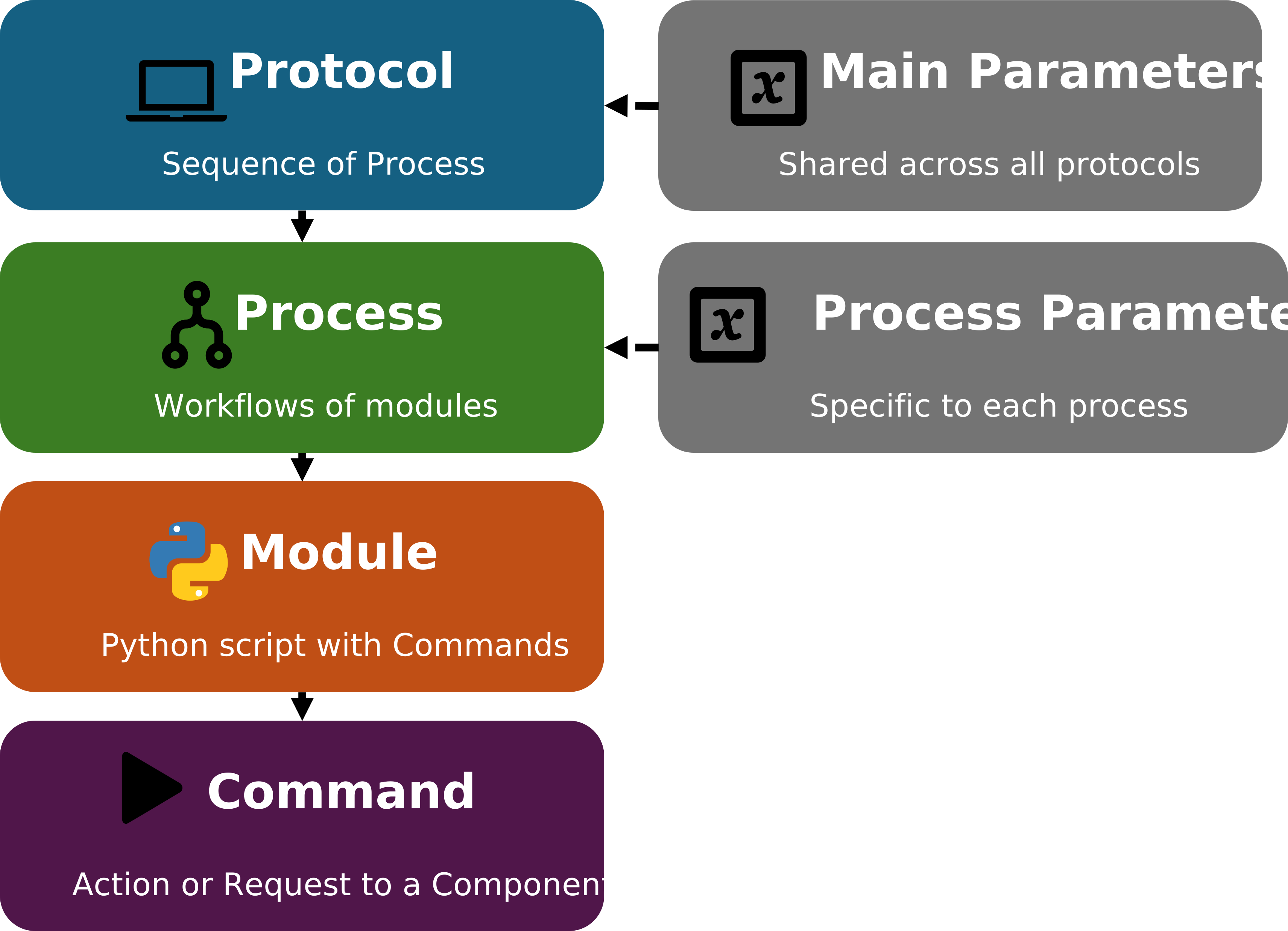
This hierarchical organization allows the orchestration to combine automation logic with flexible scripting. Complex experimental protocols can therefore be built by combining processes, modules, and component-level commands.
Explanation of Each Level
💻 Protocol
A protocol is the highest level in the orchestration hierarchy. It is composed of a series of processes, which are executed sequentially, one after another.
 Process
Each process contains one or more workflows composed of modules. Processes are executed in sequence, but within a process, the modules can run simultaneously through a multithreading workflow.
 Module
A module represents a Python script containing a sequence of commands. This design gives the user complete flexibility — any Python libraries can be used to support the protocol development.
 Command
A command is the lowest-level instruction in the hierarchy. It represents a specific request or actuation sent to an electronic component in the system (e.g., start a pump, read a sensor, open a valve).
 Parameters
The Parameters script defines a set of variables that the user can create and reuse across the entire platform. This feature is optional, but extremely helpful for complex setups where protocols depend on shared values, user-defined constants, or validation logic.
There are two types of parameters:
Main Parameters – global variables available to all protocols in the project. These typically define general configuration values that remain consistent throughout the orchestration.
Process Parameters – local variables defined within a specific process. They apply only to that process and allow fine-tuning of parameters without affecting other parts of the platform.
Using parameters promotes modularity and flexibility: the same protocol can be reused with different parameter sets, and complex workflows can automatically validate or adjust values before execution.
🧩 Process Availability
When building protocols, each process can have one of two statuses:
Available
The process is defined and stored in the protocol, but not currently scheduled for execution.
ChemUnited Protocols Panel
The main protocols panel is shown below.
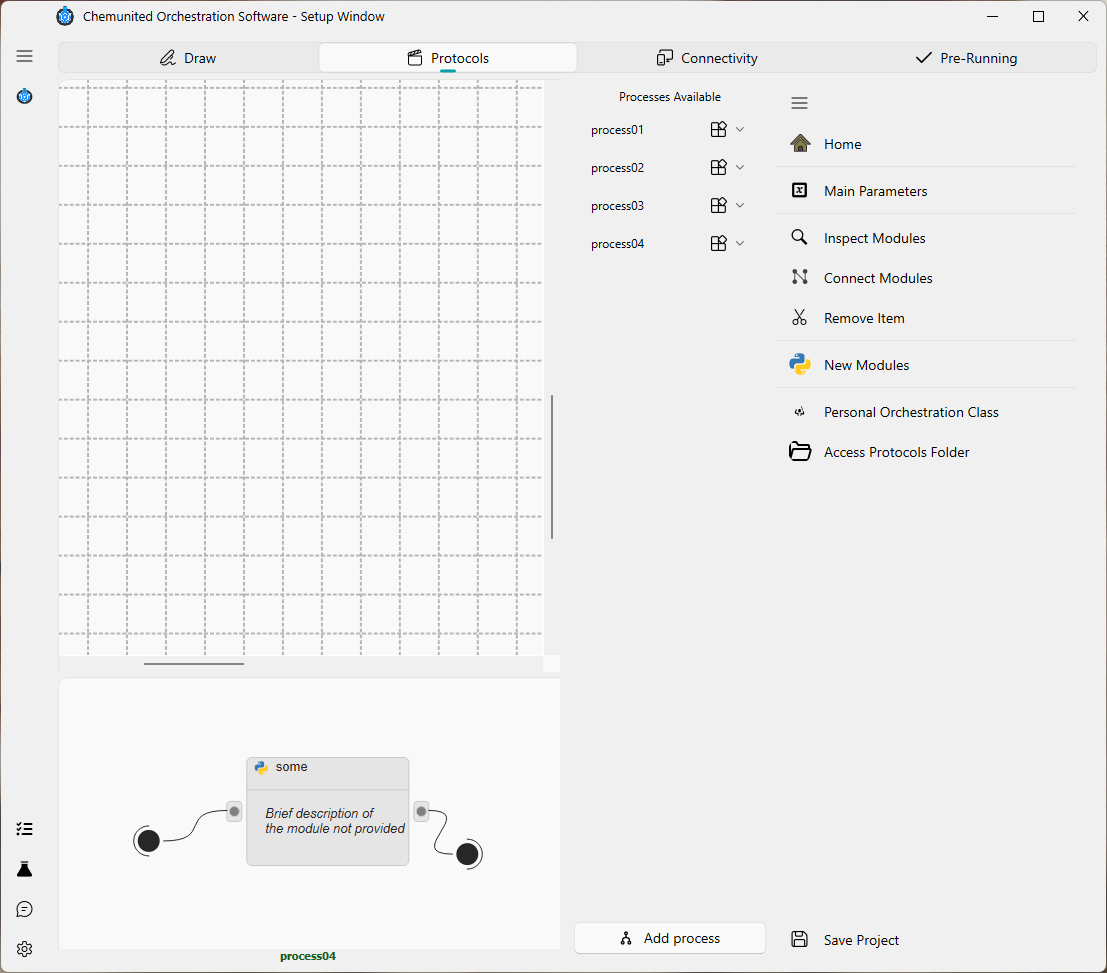
This frame is divided into three areas:
Platform layout
The platform drawing is displayed here. Although it does not have any direct functionality for protocol building, it is very useful for inspecting the physical setup so the user can write commands correctly.
Process workflow canvas
In this area the process workflow is built by adding new modules/blocks and connecting them. The details of how to build and edit workflows are explained in the next section.
Available process lists
On the right side you will find two lists: Available processes.
Each item in the list has a context menu
(accessed via  ) with the following options.
For items in the Available list:
✏️ edit: Rename the item.
- parameter: Open the process parameter settings.
📚 duplicate: Create a copy of the item.
 remove: Delete the item.
Navigation options
On the right side of the frame there is a set of navigation buttons:
- Add process
Create a new process and add it to the Available list.
- Experiment Parameters
Open the main experiment parameter script of the project. This button launches the script editor, which is described in the next section.
 Inspect Modules
Inspect modules in the process workflow. After clicking this option, click on the module you want to inspect at the
icon position.
 Create Connection
Enable connection mode to build links between modules/blocks. Click the icon of the first block, then the icon of the second block to create the connection.
 Remove Item
Enable removal mode to delete blocks/modules or the connections between them.
- New Module
Create a new module/block.
 Personal Orchestrator Class
Advanced option to open the orchestrator class script in the script editor and customize it. This feature is recommended for advanced users who need to build custom classes and objects.
 Access Protocols Folder
Open the directory where the protocol scripts are stored on the computer.
 Save Project
Save the current project protocols.