🧩 Pre-Running
The Pre-Running step is responsible for building, saving, and launching the protocols to be executed. A protocol is defined as a sequential list of processes that will be executed one after another.
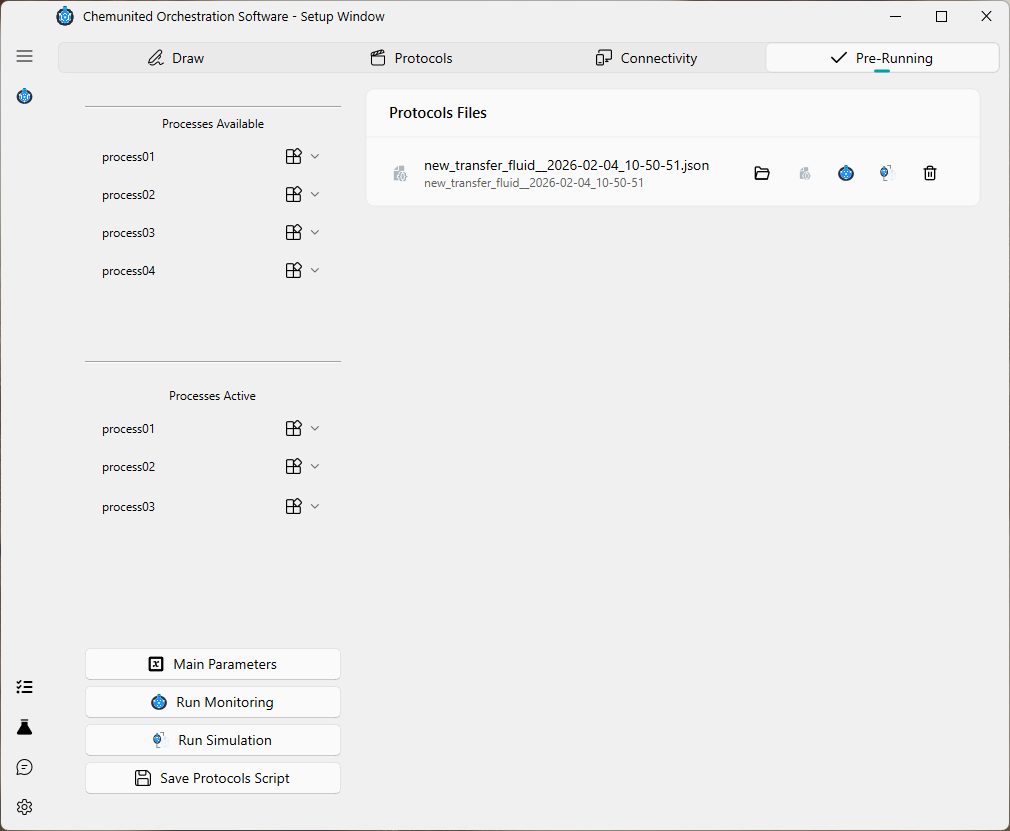
Below is the window corresponding to the Pre-Running step.
🧩 Process Availability
The Pre-Running window contains two lists of processes:
Processes Available
These processes are defined and stored in the protocol but are not currently scheduled for execution. This list is essentially a mirror of the processes defined in the Protocols frame.
Processes Active
These processes are enabled and will be executed in simulation or monitoring mode.
This separation allows the user to:
Define multiple processes
Choose which processes will be executed
Define the execution order
Repeat the same process multiple times if needed
In the example above:
The Available list contains four independent processes
The Active list contains three entries, where
process01appears twice
The resulting execution sequence will be:
process01 → process02 → process01
This flexibility in arranging the Active list (and repeating individual processes) allows the user to customize different execution scenarios according to their needs.
🛠 Options in the processes lists
Each item in the list has a context menu
(accessed via  )
with the following options.
)
with the following options.
For items in the Available list:
➡️ send: Move the item to the Active list.
For items in the Active list:
📚 duplicate: Create a copy of the item.
 parameter: Access the process parameter window.
 remove: Remove the item from the Active list.
When a process appears multiple times in the Active list, all instances share the same parameter definition, but each instance maintains its own independent parameter values.
For example, if process01 defines a parameter x:
- The first
process01in the Active list may run withx = 1 - The second
process01may run withx = 3
Changing the parameter values of one process instance does not affect the others. This allows the same process to be reused multiple times within a protocol, each time with different runtime settings.
▶ Pre-Running Actions
On the bottom-left side of the Pre-Running window, four main action buttons are available:
 Main Parameters
Access and adjust the global parameters of the project for the current protocol.
 Run Monitoring
Launch the monitoring application to execute the protocol. This requires that all electronic components are already connected and online in the Connectivity window.
 Run Simulation
Execute the protocol in simulation mode using a digital twin version of the platform.
 Save Protocol Script
Save the protocol — including all configured parameters — as a protocol script file.
The file is stored in JSON format and contains all information required to execute the protocol.
📁 Protocol Files
On the right side of the window, the Protocol Files cards are displayed. All previously saved protocols appear here, allowing users to quickly inspect or relaunch them.

Each protocol card provides the following actions:
 Open local file
Open the local folder containing the protocol script.
 Summary
Open a read-only window displaying a summary of all predefined parameters.
- Run Monitoring
Execute the protocol directly in monitoring mode.
- Run Simulation
Execute the protocol in simulation mode.
- Delete the protocol script
Permanently remove the protocol file.